Platform updates
What shipped, when, and where to see it. Every entry links to the page, guide, video or tool on this site.
October 2026
- Oct 13Feature
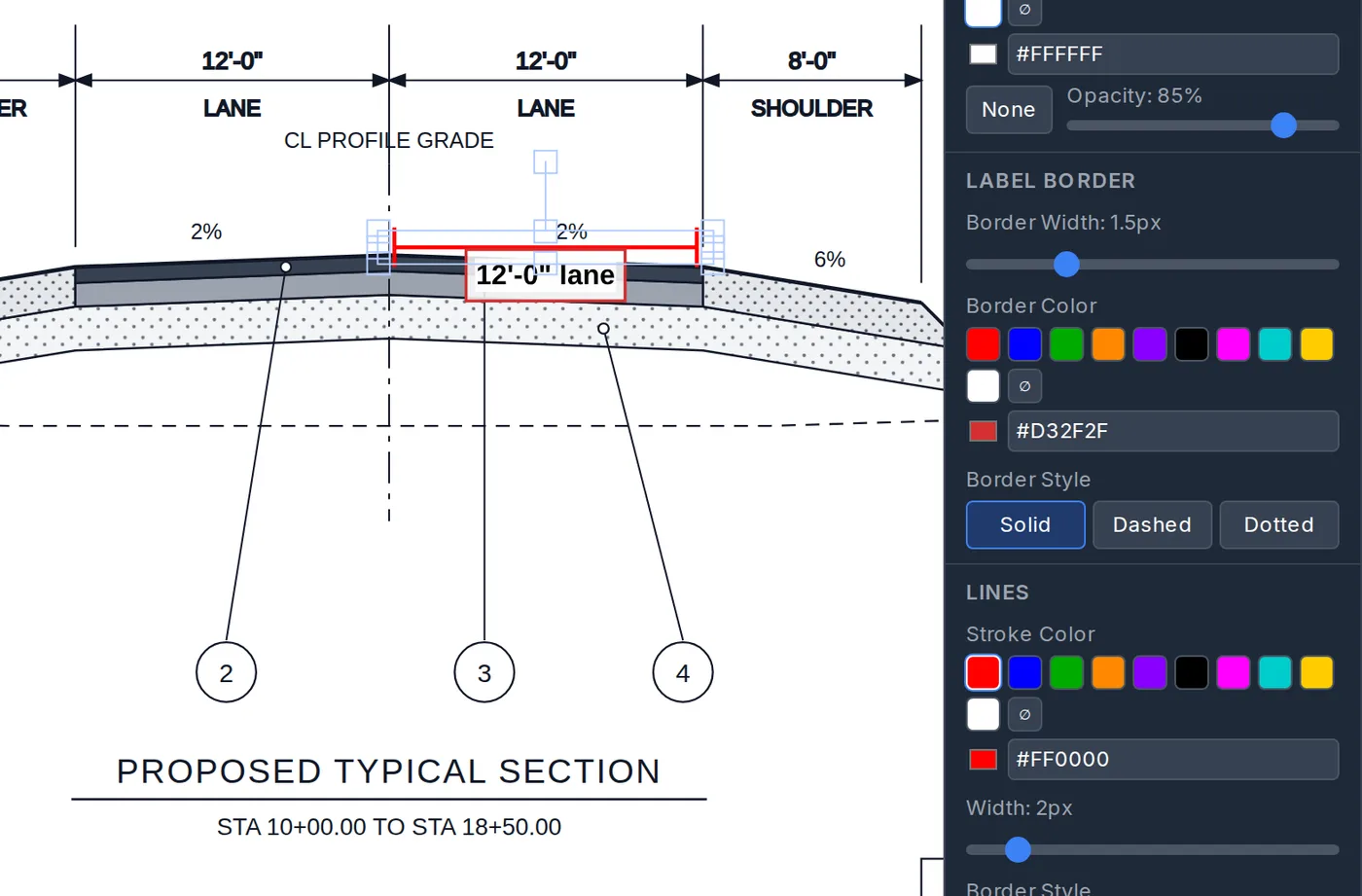
Measurement labels get their own border
A measurement's label now takes its own border, text colour and background, separate from the dimension and leader lines.
- Oct 8Feature
Early and late dates on a proposal
A proposal's timeline now carries a late start and a late finish beside the early ones, states whether the duration counts working or calendar days, and prints the constraints behind the dates. Float is computed on the internal view, never typed.
- Oct 8Feature
Attach a spreadsheet to the AI proposal generator
The proposal generator now reads an estimate, bid tab or rate sheet (.xlsx or .csv) attached beside the plan set — every sheet, every row — and a long plan read no longer ends in a network error.
- Oct 7Feature
A submittal package from several groups of days
When you build a pay item's submittal package, add more than one date range: work in August and work in October, with the September days left out. Each range is at most 90 days; the default title lists every range.
- Oct 6Feature
Add or remove a vertex on a polyline or shape
Select a polyline or closed shape and a small circle sits at the middle of each segment: drag it, with a finger or a mouse, and it becomes a new vertex. Alt+click a vertex to remove it, or press and hold it on a touch screen. The tool ribbon shows an arrow at either end when more tools are hidden that way.
- Oct 6Feature
Hold the mouse wheel to pan, P for the hand
In the annotation editor, holding the mouse wheel button and dragging moves the sheet under any tool, and P now switches to the hand like H does. A line no longer starts at zero width, and the calibration field shows what you type.
- Oct 5Feature
Rename an annotated photo or page
An annotated photo no longer keeps its file name for life. Rename it from the top of the editor, and find it by that name when you attach a drawing to an activity note or build a submittal package.
- Oct 5Feature
Plan sheets in a submittal package stay sharp when you zoom
A marked-up plan sheet now goes into a pay item's submittal package as the plan sheet itself, pinned to the revision it was drawn on, with the package's own copy of the marks. It zooms as cleanly as the plan viewer. Regenerate an older package to get it.
- Oct 2Feature
Add a page where you are, not at the end
The Add page menu now asks where the new page goes: after the page you are on, or at the end. Blank pages, pictures, plan and PDF pages, Excel and cross-section pages all follow it, on a phone or a tablet as well as a desktop.
- Oct 2Feature
Find a daily report by what is in it
The Daily Reports search now reaches past the report name: a pay item code or description, an activity note, a contractor, a piece of equipment, a material ticket, a delivery or a truck tap session finds the report, and each result says what matched.
- Oct 1Feature
Lock a picture, or send it behind the marks
A picture laid over a drawing selects by its whole box, so the lines under it could not be clicked. Select the picture for Lock picture, Send to back and Bring to front; a chip unlocks it again. A page that opens short of its record now says so and refuses to save until it reloads whole.
- Oct 1Feature
A photo frame moves its picture
Drag or scale the frame of a photo callout and the picture comes with it; a Crop mode keeps the old behaviour, Fit picture fills the frame, and a circle frame stays a circle.
- Oct 1Feature
Lay a picture or a PDF page over a drawing
Paste or drop a picture, or drop a PDF from your computer onto a drawing, and fade it from the Style panel to see the sheet beneath; dropping a PDF on the page rail still imports it as pages.
- Oct 1Feature
Rotate a page and keep it that way
Turn any page a quarter turn from the page bar — image, blank, plan or PDF; the marks turn with it and the document reopens in that orientation. Text boxes gained alignment and a background control, leaders an arrowhead size.
September 2026
- Sep 25Feature
Calc boxes print the way you drew them
A calculation box on a plan sheet now lays out its text the same way on your screen and on the exported page, at any zoom, so a cloud drawn around a row prints around that row.
- Sep 23Feature
Mark up a sheet in your browser
The markup editor from inside the platform, on a sample sheet we drew for it: measure, dimension, cloud, stamp, take a section off the sheet. Nothing is saved.
- Sep 22Feature
Take a detail off the plans
Box a part of a plan sheet and place it on your markup sheet as the drawing it already is: crisp at any size, with every line, arrow and label still its own object you can move or delete.
- Sep 17Feature
The document builder, in your browser
Two landscape pages in the real editor: a calc box that evaluates every line with units and a calc table on the same engine, both already started.
- Sep 16New page
Try it on your state
Superseded Nov 7Pick your state. Illinois (IDOT and the Tollway) is built; every other state records your request. Superseded 2026-11-07 — Now: Try it on a real DOT spec book. First state built: Illinois. Tell us your DOT.
- Sep 14Feature
Try the calc engine in your browser
Three worksheets evaluated by the real engine, then a live worksheet with units you can edit — no account needed to read, an email to try.
- Sep 14New page
Compare pages, with prices
CEI inspection, construction PM and bidding, side by side with the tools you know — features as checks and minuses, and what a seat costs per year.
- Sep 14Video
Video: material tickets → daily reports → pay items
How a ticket captured in the field lands on the daily report for its day and the pay item it pays, so the quantity, the ticket and the report stay one record.
- Sep 14Pricing
Founding rates: $40 · $55 · $65
Inspector, project manager and admin seats at the founding rate, locked while you stay subscribed; the Starter Team is $175 for four.
- Sep 8Pricing
Personal is free
Superseded Nov 7A company of one: your own project, tasks, notes, daily reports and the pay-item atlas. Superseded 2026-11-07: Personal is now a 30-day trial. No credit card. Every feature, with limits.